UI/UX Designer & Researcher

Designing experiences that matter.

Hi, I'm Cat. I'm currently pursuing my M.S. in Experience & Information Design. I create human-centered experiences that are intuitive, intentional, and a little bit fun.

Catherine Carter — UI/UX Designer
UI/UX Design User Research Information Architecture Prototyping Interaction Design Experience Design Figma Design Systems UI/UX Design User Research Information Architecture Prototyping Interaction Design Experience Design Figma Design Systems

Featured Work

All Projects
01
Human Centered Design · Case Study
Body-Worn Camera Interface

Redesigning a police body-worn camera interface so new and less tech-savvy officers can navigate it confidently under pressure — reducing recording errors and device misuse.

Catherine Carter — UI/UX Designer
About Me

I design for people, not just screens.

I'm Catherine "Cat" Carter, a Google-certified UI/UX designer and I'm currently pursuing my M.S. in Experience & Information Design at UM, where I'm deepening my practice at the intersection of research, systems thinking, and human-centered design.

My work spans the full design spectrum, from mapping complex information architectures to prototyping real-time interactive systems. I've designed accreditation tracking systems, conference registration experiences for 500+ attendees, and live event engagement tools. I bring a systems perspective to every project: understanding how people, processes, and interfaces work together.

I believe great design is never just visual. It's structural, empathetic, and grounded in real user needs. When I'm not in Figma, I'm probably exploring Miami's creative scene, geeking out over data visualization, or finding design inspiration in the most unexpected places.

Skills & Tools

Figma User Research Wireframing Prototyping User Testing Service Design Data Visualization HTML / CSS Adobe XD Illustrator Salesforce Qualtrics GitHub Canva

Education

2024–
2027
M.S. Experience & Information Design
University of Miami · Coral Gables, FL · GPA 3.5
Case Studies

Selected Work.

A student project exploring user-centered design, research, and interaction — with more on the way.

01

Body-Worn Camera Interface: Redesigning Police Accountability

New and less tech-savvy officers struggle to navigate body-worn camera interfaces during high-pressure situations — leading to recording errors, device misuse, and reduced accountability. This 7-week Human Centered Design project redesigned the BWC interface from the ground up, with 3 rounds of user testing and a full Figma prototype.

Human Centered Design UX Research Interface Design Figma Prototyping
View Case Study →
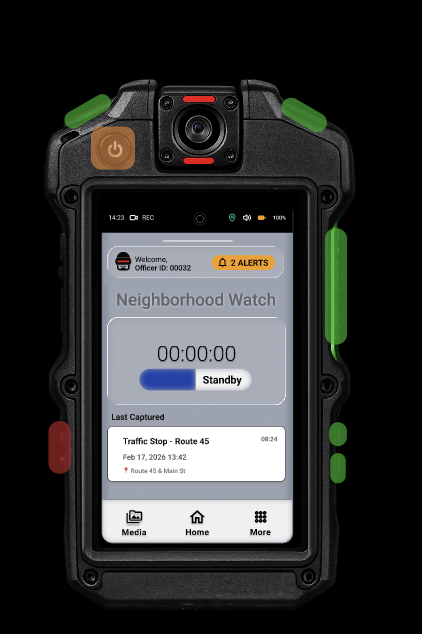
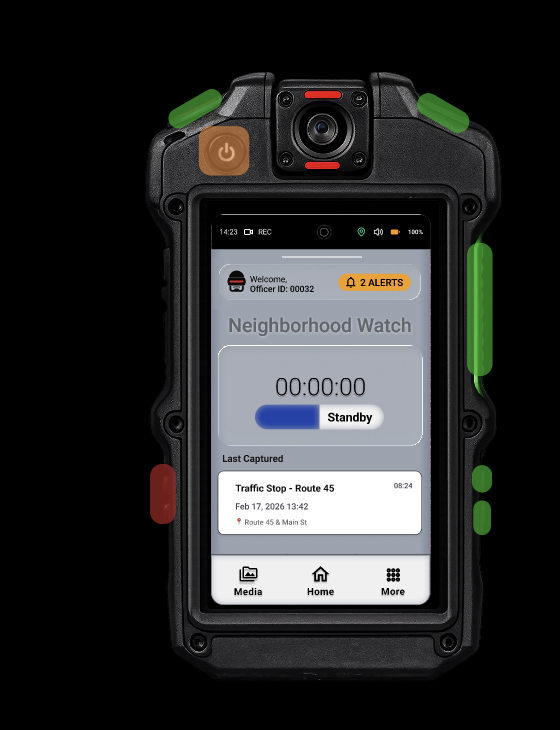
BWC Interface — Home Screen
Coming Soon

More work in progress.

I'm actively working on new case studies as part of my Masters program. Check back soon!

Résumé

Cat Carter.

Download PDF ↓
cvcarter@miami.edu
Miami, FL
Figma Comfortable
Wireframing & Prototyping Comfortable
User Research Developing
Service Design Familiar
Data Visualization Learning
HTML / CSS Learning
Figma Adobe XD Illustrator Canva Salesforce GitHub Qualtrics Asana Mailchimp CVENT Workday Cascade Microsoft Suite Google Suite
Claude Code Cursor Gemini Figma Make
Google UX Design Certificate
Master of Science, Experience & Information Design
Expected May 2027
University of Miami · Coral Gables, FL
GPA: 3.5  ·  Focusing on human-centered design, information architecture, interaction design, and service design methods.
Manager — Systems & Experience Design
July 2021 – Present
University of Miami · Miami Herbert Business School · Coral Gables, FL (Hybrid)
Designed and implemented an accreditation information system to track complex faculty and student data across two graduate programs, improving data accuracy, accessibility, and audit readiness. Developed a real-time attendee question submission system that enabled moderation and improved speaker–audience interaction during live events. Designed and iterated on a conference registration experience for 500+ annual attendees, improving information hierarchy and user flow. Led research and benchmarking by analyzing peer institution workflows to inform system design and best practices.
Medical Services Coordinator
Jan 2021 – July 2021
Pearl Interactive · Remote
Supported users across multiple digital systems, resolving issues related to healthcare services and appointments. Documented user interactions and system actions to ensure continuity across channels. Navigated complex workflows while maintaining accuracy and user empathy in high-volume environments.
Administrative Lead / Office Manager
Feb 2015 – Apr 2020
MD NOW Urgent Care · Hallandale Beach, FL
Led operational workflows and staff scheduling for a high-volume healthcare environment averaging 50+ patients daily. Facilitated daily and monthly staff communication sessions to align teams and improve service delivery. Designed internal tracking systems for billing and coding errors, improving issue resolution efficiency. Coordinated community outreach and information presentations to improve patient awareness and engagement.
← Back to Projects
Human Centered Design · Spring 2026

Body-Worn Camera Interface:
Redesigning Police Accountability

Redesigning the body-worn camera interface so that new and less tech-savvy first responders can navigate it confidently during high-pressure situations — reducing device misuse, recording errors, and apprehension about the technology.

👥 Team: Neighborhood Watch 📚 Course: CIM 622 Human Centered Design 📷 Platform: Body-Worn Camera ⏱ 7 Weeks · Jan – Mar 2026
42%
of footage currently released to public
High
cognitive load on officers during incidents
3
rounds of user testing & iteration
4
team members
Contributions

My Role & Contributions

As a member of the Neighborhood Watch team, I led the interface design for several core features, contributed to user research and task documentation, and prototyped the physical device throughout this midterm project.

Interface Design

  • Full settings menu (volume, brightness, text size)
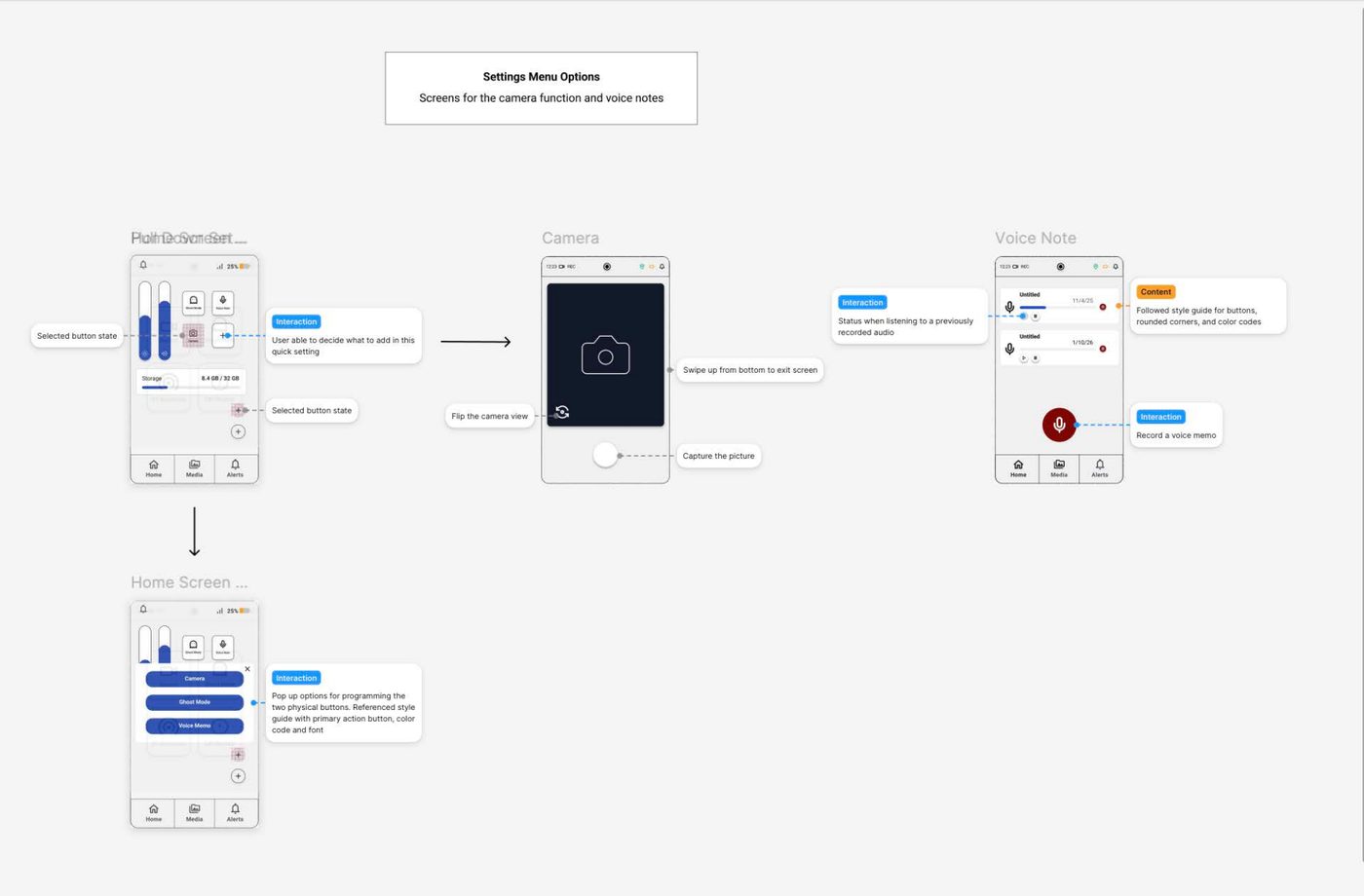
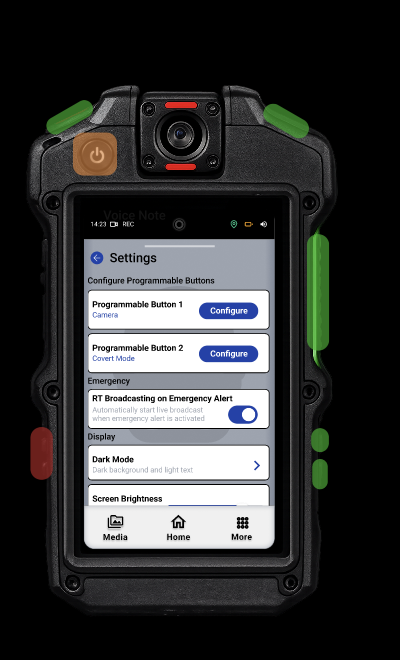
  • Programmable physical button configuration screen
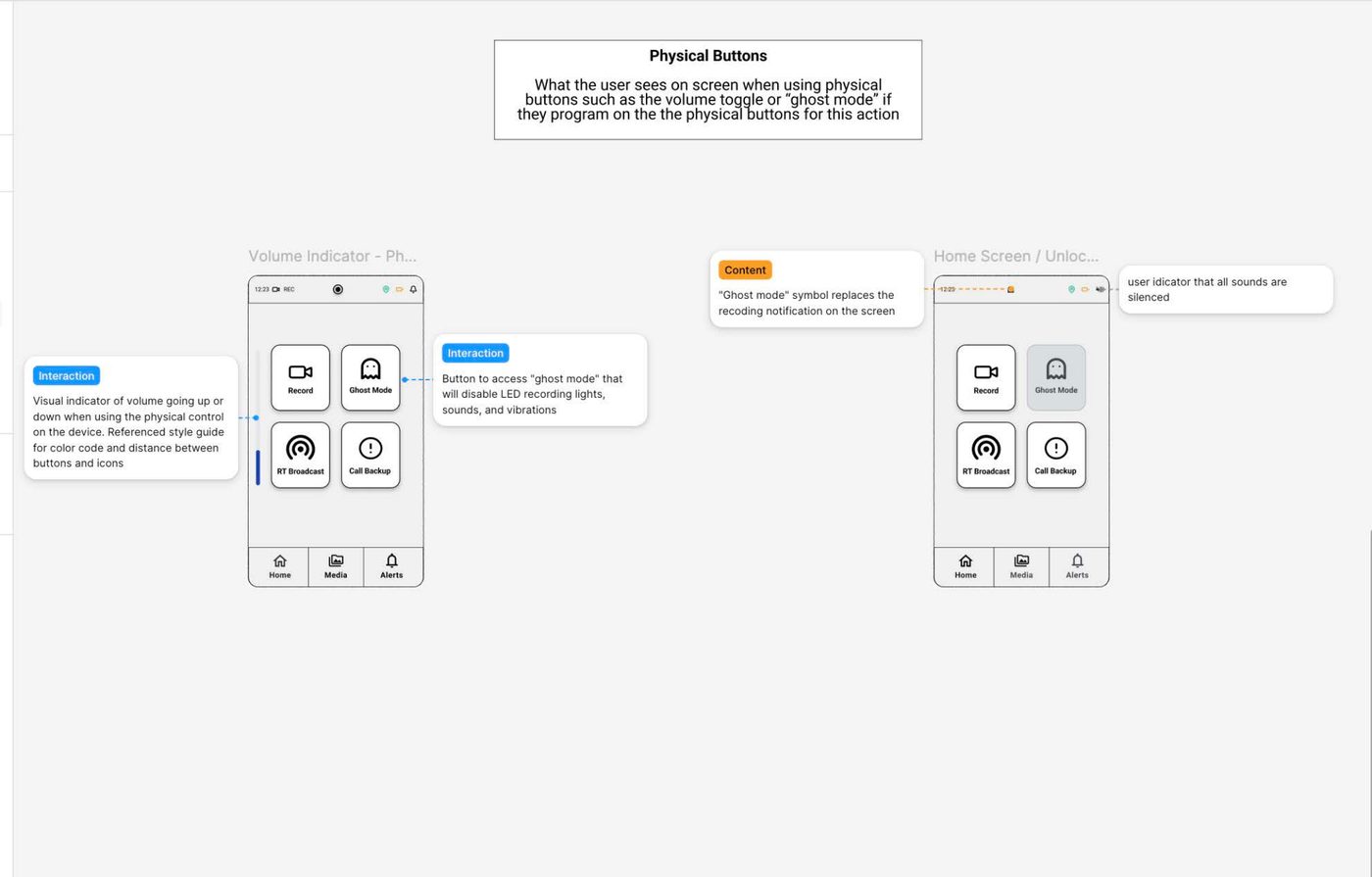
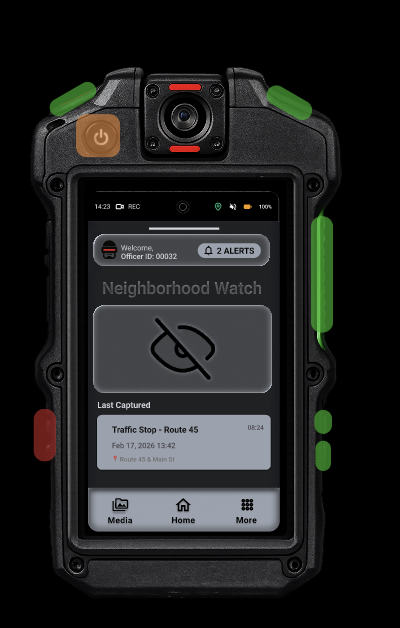
  • Enable/Disable Covert (Incognito) Mode feature
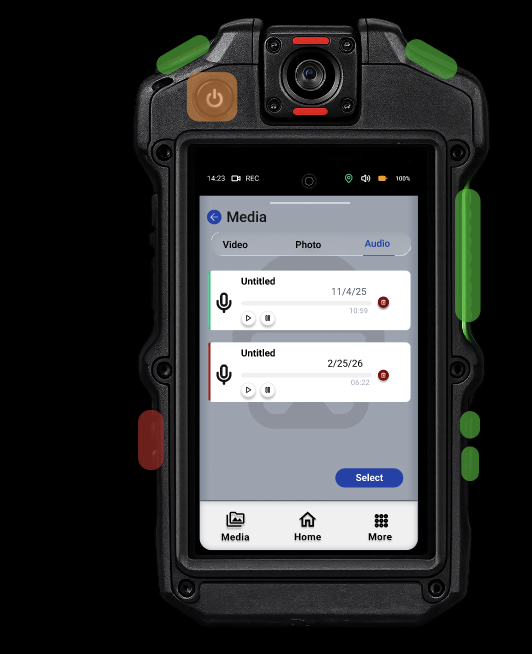
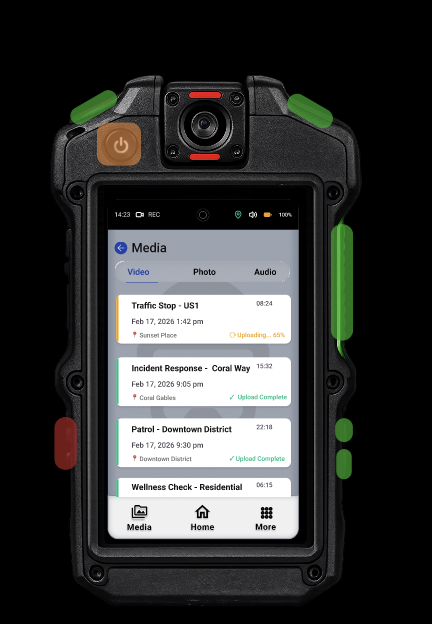
  • Media library and gallery interface
  • Camera function screen
  • Physical device prototype

Future Opportunities

Ideas for the next iteration, informed by user testing and professor feedback.

  • AI-Assisted Incident Tagging
    Speech-to-text support that auto-tags recordings with incident type, location, and officer ID as footage is captured.
  • Smart Media Search & Filters
    Search and filter recordings by date, location, tag, or incident type — making evidence retrieval fast in high-pressure moments.
  • Push-to-Talk Redesign
    A dedicated PTT screen with clear active/inactive state indicators and haptic confirmation — essential for field use.
  • Physical Button State Feedback
    Visual and haptic cues that confirm when a physical button has been pressed or programmed, reducing uncertainty in the field.
  • System Health Dashboard
    A glanceable status view showing battery level, storage capacity, sync status, and connectivity — all critical before going on shift.

Research & Documentation

  • User feedback gathering and organization
  • Concept maps and ideation sketches

Worked collaboratively with the full team on research, ideation, and iterative design refinements throughout the project lifecycle.

Team:
CC
Catherine Carter
MH
Ma'at Hetep
VO
Vivian Orellana
ML
Matt Liff
Ideation

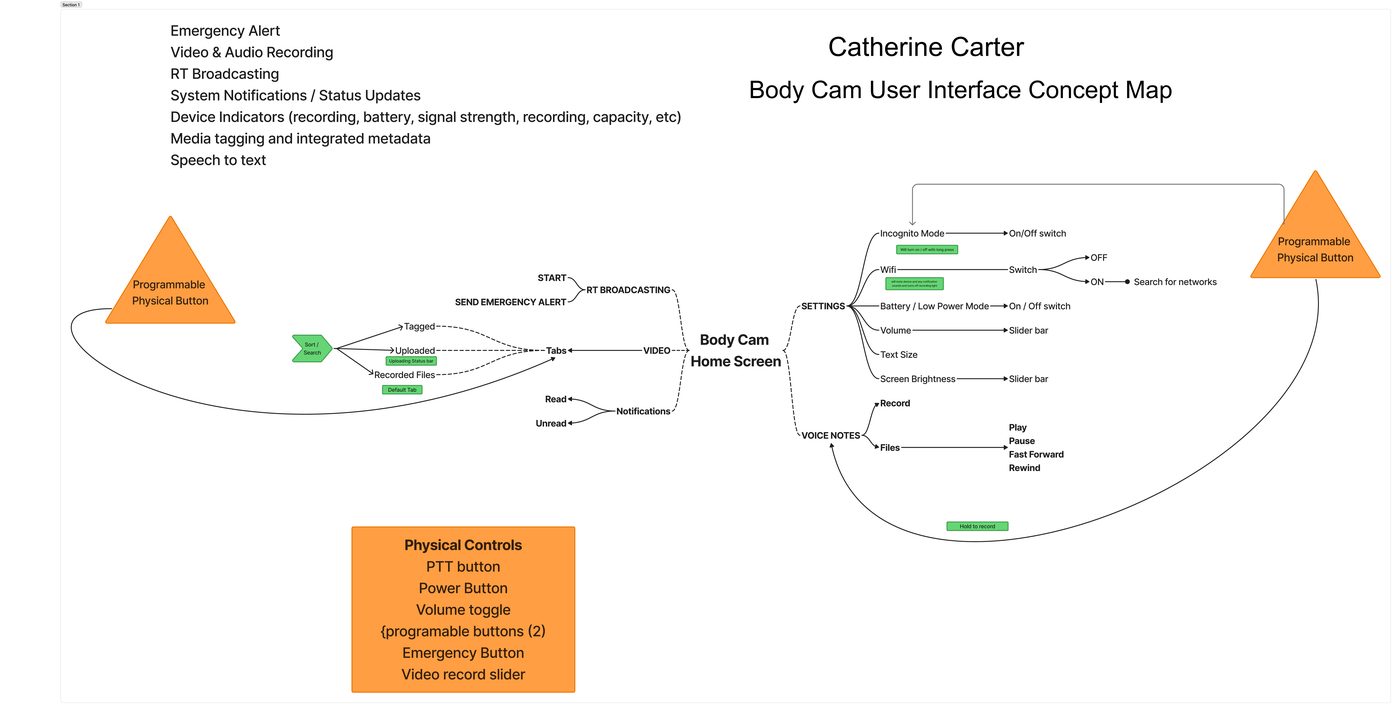
Sketches & Concept Map

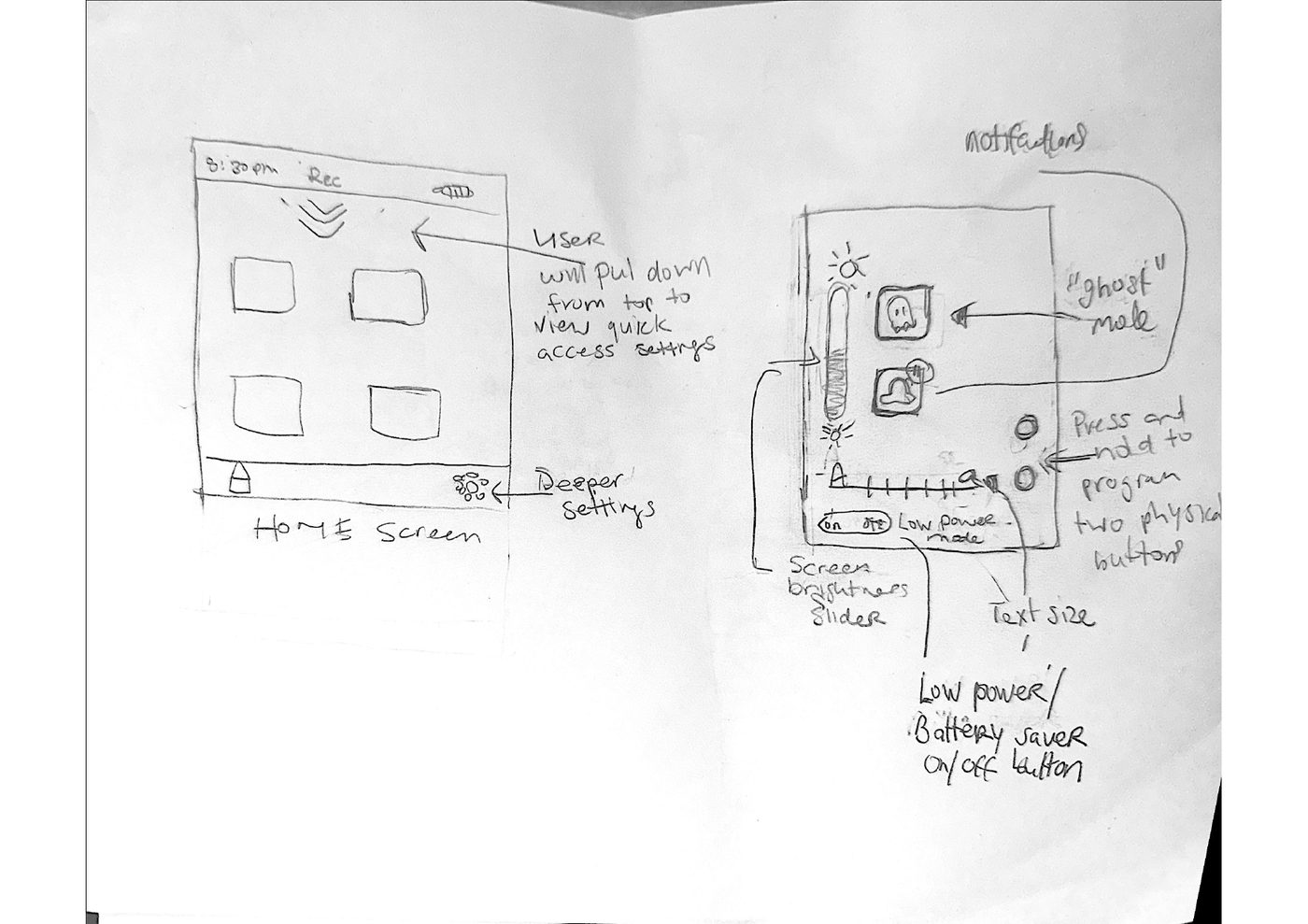
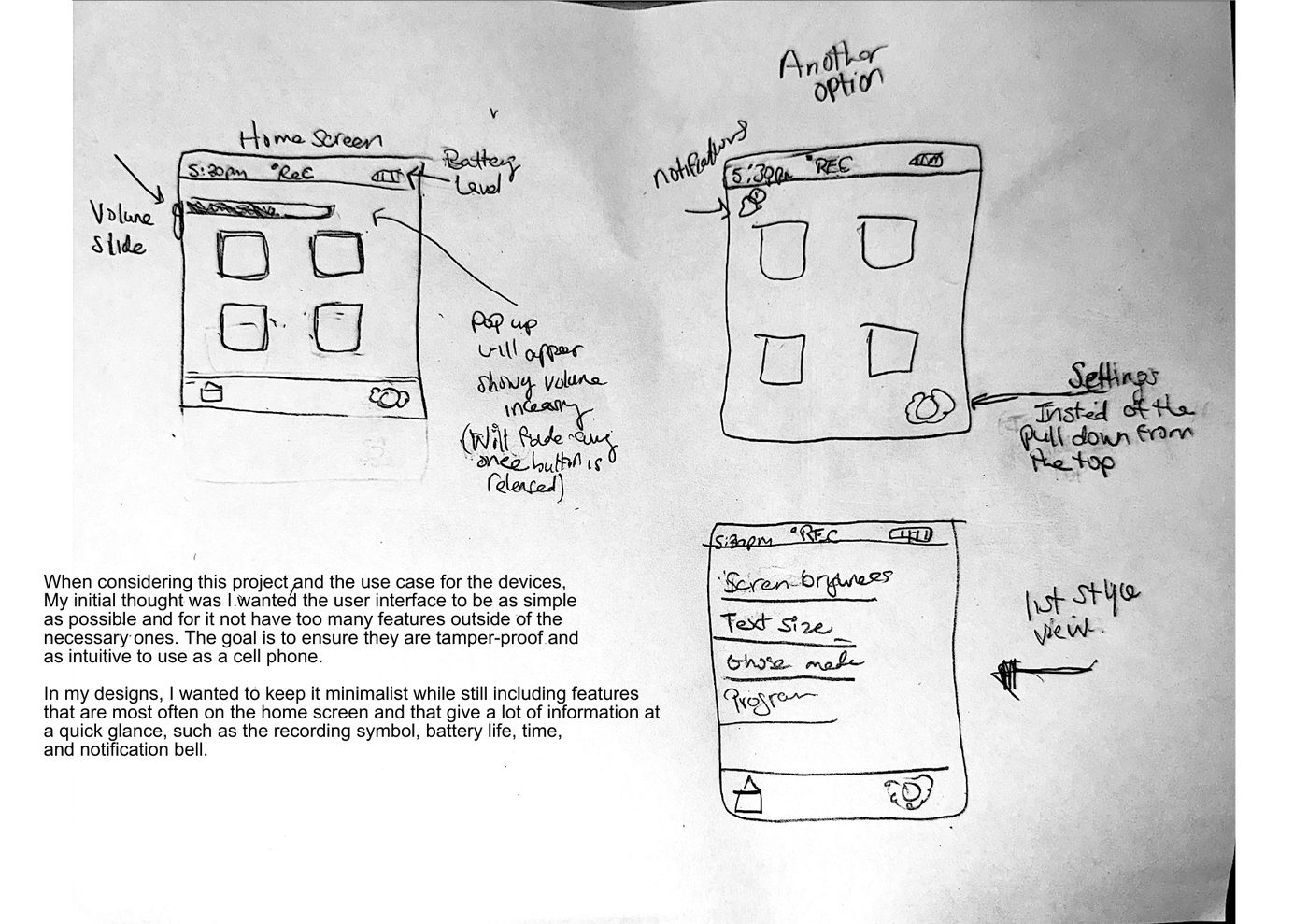
Hand-drawn sketches and concept maps created during the ideation phase to explore interface layouts and map out system features.

Interface Sketches

Interface sketches page 1
Sketches — Page 1
Interface sketches page 2
Sketches — Page 2

Concept Map

Body Cam User Interface Concept Map
The Problem

Despite increasing mandates for body-worn cameras, new officers find them nearly impossible to use under pressure.

This complexity leads to device misuse, recording errors at pivotal moments, difficulty accessing data, and increased apprehension about the technology — directly undermining the accountability these cameras are meant to provide.

📊
Selective Evidence Release

Only 42% of body camera footage is currently released to the public, limiting accountability and transparency.

🧠
Cognitive Overload

Officers struggle with complex interfaces during high-stress situations, diverting focus from the incident itself.

🔍
Subjective Interpretation

Footage review lacks contextual clarity and metadata, leading to vastly different assessments by reviewers.

⚙️
Limited Functionality

Current systems lack features for evidence organization, quick reference, and contextual metadata tagging.

Discovery

Research & Discovery

We conducted extensive secondary research to understand the historical context, current challenges, and design opportunities in body-worn camera technology.

Background & Adoption

Body-worn cameras used by law enforcement began in the U.S. as a pilot program in 2012 in Phoenix and Mesa, Arizona, and Rialto, California. The Rialto pilot saw significant success — reporting an 88% reduction in complaints against law enforcement officers (American Police Officers Alliance, 2018) — but the program spread slowly due to cost concerns.

Adoption accelerated in 2014 following the killing of Michael Brown in Ferguson, Missouri. President Obama proposed federal reimbursement for half the implementation cost, and Attorney General Loretta E. Lynch announced $28 million in grants across 32 states to expand BWC use (US Department of Justice, 2015).

In 2021, questions about effectiveness still lingered. Portland City Commissioner Jo Ann Hardesty stated: "I am reluctant to make an expensive investment in body-worn cameras because they have failed to provide accountability to other police departments and have not reduced police use of force." (Iboshi, 2021).

Today, more than half of all states have mandated BWC use by law enforcement. Cameras are more affordable and technology has improved, but significant hurdles remain: data storage, training, and protocols (The Editors of ProCon, 2025).

Usability & Training Challenges

Improper Tagging = Lost Evidence

Tagging is typically done by the investigating officer in the field, or at the end of each shift prior to uploading. When done improperly or omitted, it can result in the loss of vital evidence — including accidental deletion after upload (Gehring, 2023).

Design Causes Misuse — Not Just Training

Accidental activation and premature deactivation stem from poor button placement. Research shows that mounting position and activation methods greatly affect usability — suggesting these errors don't come solely from lack of training, but from interfaces that fail to account for stress and divided attention (Suss et al., 2018).

AI Activation Reduces Mental Load

New research shows that automated and AI-assisted activation systems reduce the officer's mental load during high-stress situations and improve recording consistency (Journal of Criminal Justice, 2025). Despite widespread implementation, a significant gap persists between enforcement guidelines and the human-centered usability of these devices.

Design Precedents

Axon Body 4 (2023)
Industry Standard Law Enforcement Camera

Features a clear indicator light showing when it is on and recording, and a battery-life display visible without removing the device — providing immediate feedback designed for high-stress situations.

Design Takeaway: High-visibility status indicators and accessible hardware controls are essential for real-world law enforcement use.
GoPro Hero7
Consumer-Grade Intuitive Design

Touchscreen gestures like swiping and long-pressing are familiar to smartphone users, reducing the learning curve. Demonstrates effective use of limited screen space with large, clear indicator buttons.

Design Takeaway: Familiar touch interactions and clear button affordances reduce cognitive load — directly inspiring the large button layout and swipe-down settings menu.
Both designs inform my project goals — from Axon's high-visibility indicators to GoPro's intuitive touch interface — demonstrating the intuitiveness and clean design I focused on throughout this project.

Sources

American Police Officers Alliance (2018) — Police Use of Body-Worn Video: A Brief History Ballotpedia — Police Body Camera Use in the United States Gehring (2023) — Body-Worn Video Tagging Errors: Ramifications, Prevention, Correction Journal of Criminal Justice (2025) — Automation and AI in Police Body-Worn Cameras Federal Register (2022) — Biden Executive Order on Advancing Effective Policing Axon — Police Body Cameras: How It Started R Street Institute — The Past, Present, and Future of Police Body Cameras
Design

Design Process

Our human-centered design approach followed an iterative methodology from research through evaluation, ensuring user needs drove every decision.

1
Research

Reviewed Android UI Kit, studied existing body cam products

2
Sketching

Mini design sprint — sketched multiple interface layouts

3
Wireframe

Created wireframes from strongest sketch concepts

4
User Testing

Two wireframe testing rounds, analyzed feedback between rounds

5
Hi-Fi Prototype

Built final high-fidelity prototype in Figma

Wireframes

Wireframe page 1
Wireframe — Screen Set 1
Wireframe page 2
Wireframe — Screen Set 2
Wireframe page 3
Wireframe — Screen Set 3
Design Philosophy
"I wanted to keep it minimalist while still providing buttons that gave a lot of information at a quick glance, such as the recording symbol, battery life, time, and notification bell."

Key Design Decisions

Recording Must Be Effortless

Start/stop recording via a physical slider button — a single action with immediate audio and visual feedback (beep + red light).

Settings Need Quick Access

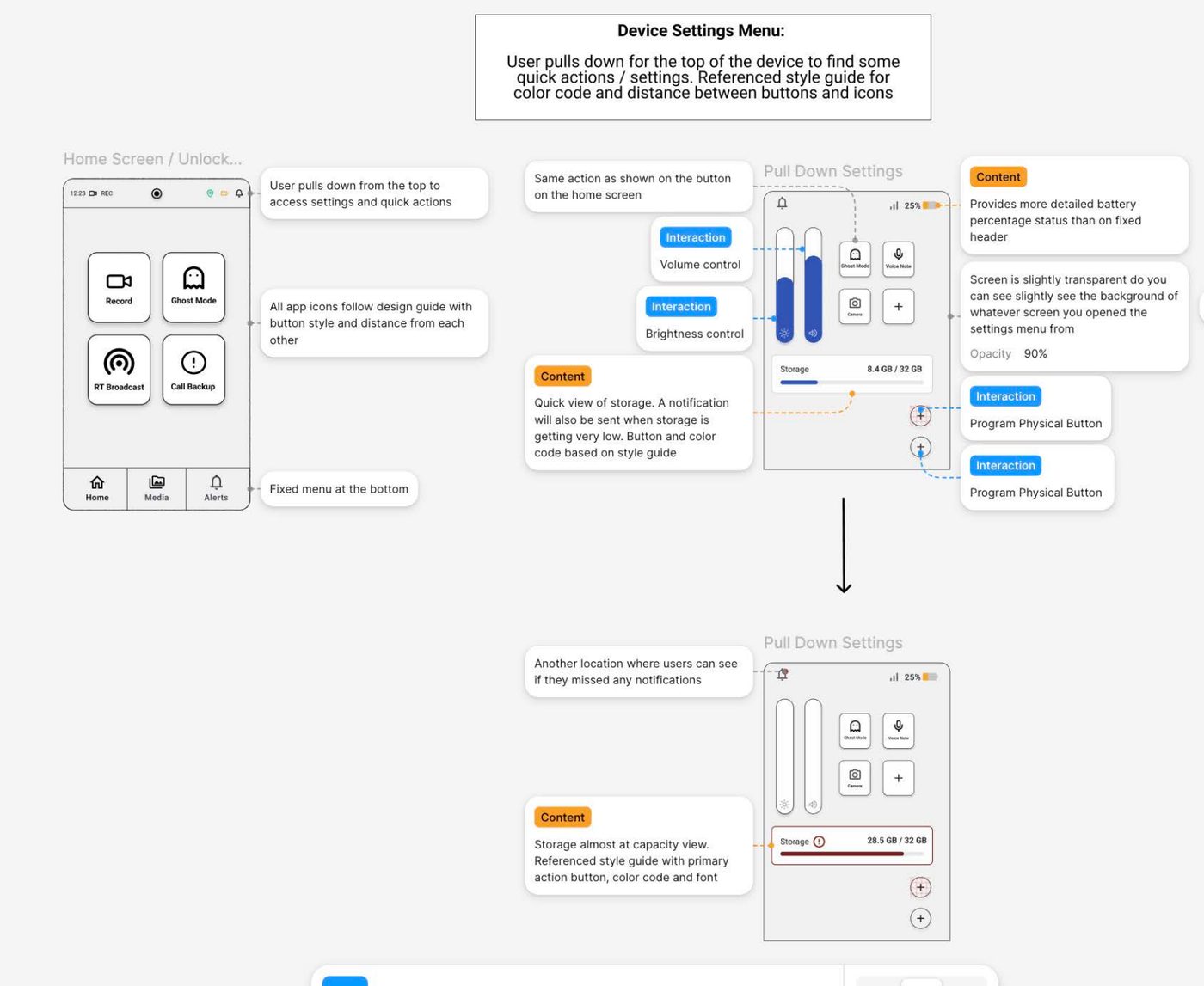
Swiping down from the top opens settings — a familiar gesture that avoids deep menu navigation during active use.

Covert Mode Is Safety-Critical

Disabling indicator lights and sounds for stealth operations is essential and must be quickly toggled — assigned to my design scope.

Tagging Requires Simplicity

Officers can swipe left on a video and select from prepopulated tags — reducing the manual input that leads to evidence misplacement.

Evaluation

Testing & Iteration

Through structured feedback sessions and professor critique, we identified critical usability issues and refined our interface to better serve officers in high-stress field situations.

3
User Testing Rounds
Structured feedback with think-aloud protocol
1
Professor Critique
Expert evaluation of physical button integration
5
Core Tasks Tested
Login, recording, media review, emergency, settings
User Testing

Feedback & Design Decisions

Three rounds of participant testing and a professor critique surfaced key usability gaps — each finding directly shaped the final design.

Round 1
What Worked

Layout and visual hierarchy were clear. Buttons were easily identifiable and the overall structure felt organized.

Issues Found
  • "Ghost Mode" terminology was unclear
  • "+" button on home screen lacked clear meaning
  • Emergency activation feedback wasn't strong enough
Round 2
What Worked

UI clarity was appreciated. Media browsing felt intuitive to navigate.

Issues Found
  • Ghost Mode still confusing across participants
  • No visible low battery warning
  • Media page needed search & tagging tools
Round 3
What Worked

Interface felt structured and readable. Videos were easy to locate.

Issues Found
  • Ghost Mode label unclear again
  • "+" button purpose still ambiguous
  • Desire for clearer feature categorization
Professor Critique

Expert evaluation identified deeper structural gaps beyond terminology — pointing to missing system states, incomplete physical button integration, and the need for a fully-realized media library.

Key Issues
  • Loading states not clearly communicated
  • PTT screen not properly designed
  • Physical button behavior not fully prototyped
  • Redundant on-screen controls for physical buttons
Takeaways
  • Media library must support search, tags & metadata
  • Visual state changes needed for programmed buttons
  • Login screen should better demonstrate responsiveness
  • Alert acknowledgment adds unnecessary friction
Design Decisions Made
🕵️
Renamed to Covert Mode

"Ghost Mode" caused confusion in all three rounds — renamed to "Covert Mode" for immediate clarity.

🔍
Media Search & Tagging

Added ability to add and remove tags on videos.

📡
Removed Live Broadcasting Button

Made this a automatic feature when the user sends a emergency alert

🚨
Stronger Emergency Feedback

Emergency activation now includes visual confirmation, a clear message, and a persistent status indicator.

🔲
Clearer Action Buttons

Replaced the ambiguous "+" button with clearly labeled action buttons to improve affordance.

🔋
Visible System Status

Added prominent system status indicators throughout the interface.

Final Screens

Prototype Screens

The final Figma prototype reflects usability testing with three participants and iterative refinements based on their feedback, optimizing the design for clarity, speed, and low cognitive load in high-pressure situations.

Home Screen
🏠 Home Screen
Standby mode with last captured footage
🕵️ Covert Mode
🕵️ Covert Mode
Discreet recording — no visible indicators
⚙️ Settings
⚙️ Settings
Programmable buttons & display options
🎙️ Audio
🎙️ Audio
Browse and play audio recordings
🎞️ Video Library
🎞️ Video Library
Organised video media with metadata
Next Steps

View the Full Prototype

Explore all screens and interactions in the Figma prototype, or head back to see more projects.

View Figma Prototype → ← All Projects
}